Website Not Converting? Here's How to Find Out What's Actually Wrong

@nadolconverts
Kacper Nadol
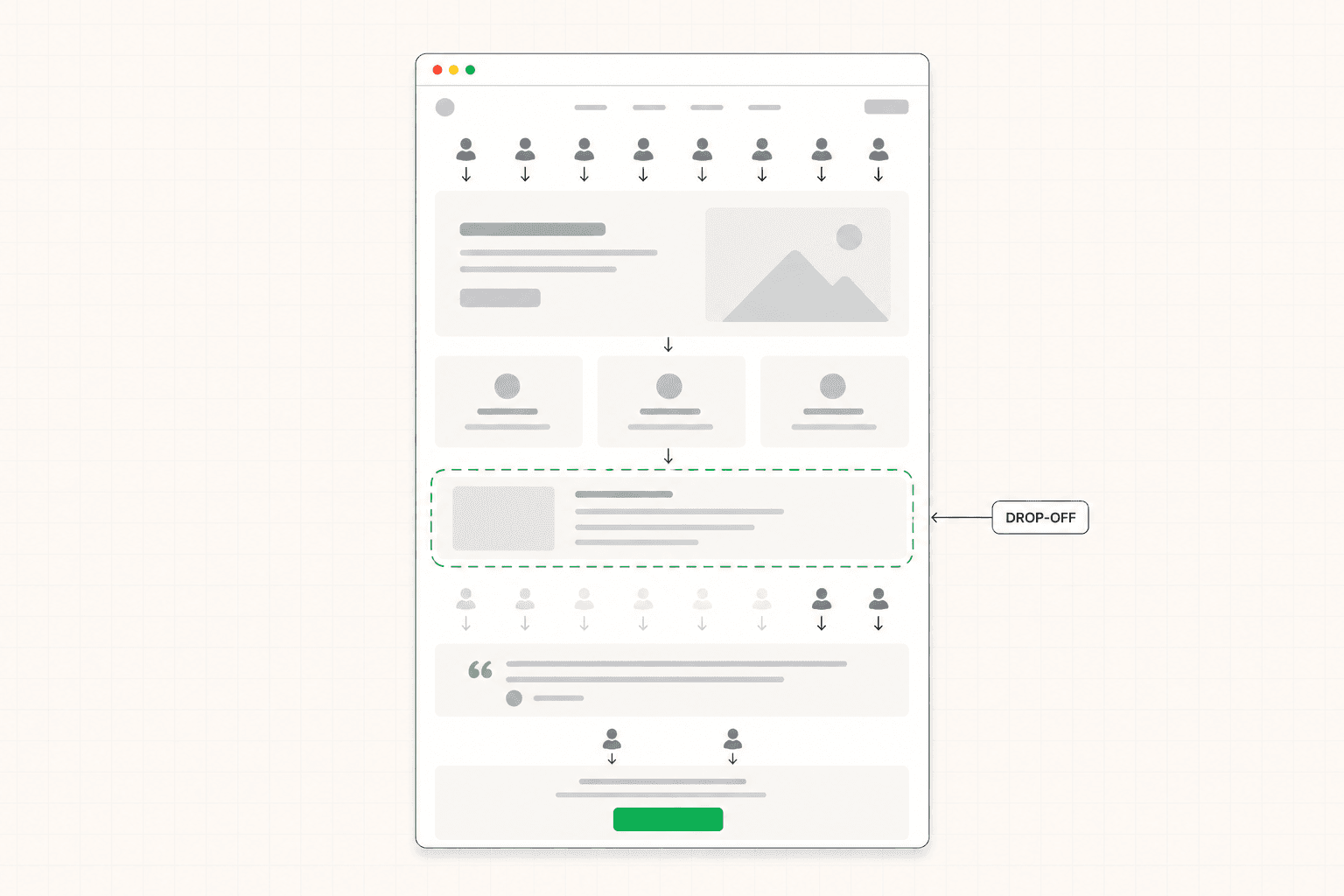
When a website stops producing leads, the temptation is to start changing things. New headline, new design, new CTA. None of it works reliably without first understanding what is actually broken. This article walks through how to diagnose a website that is not converting before spending time or money trying to fix it.
Why "Not Converting" Is the Wrong Place to Start
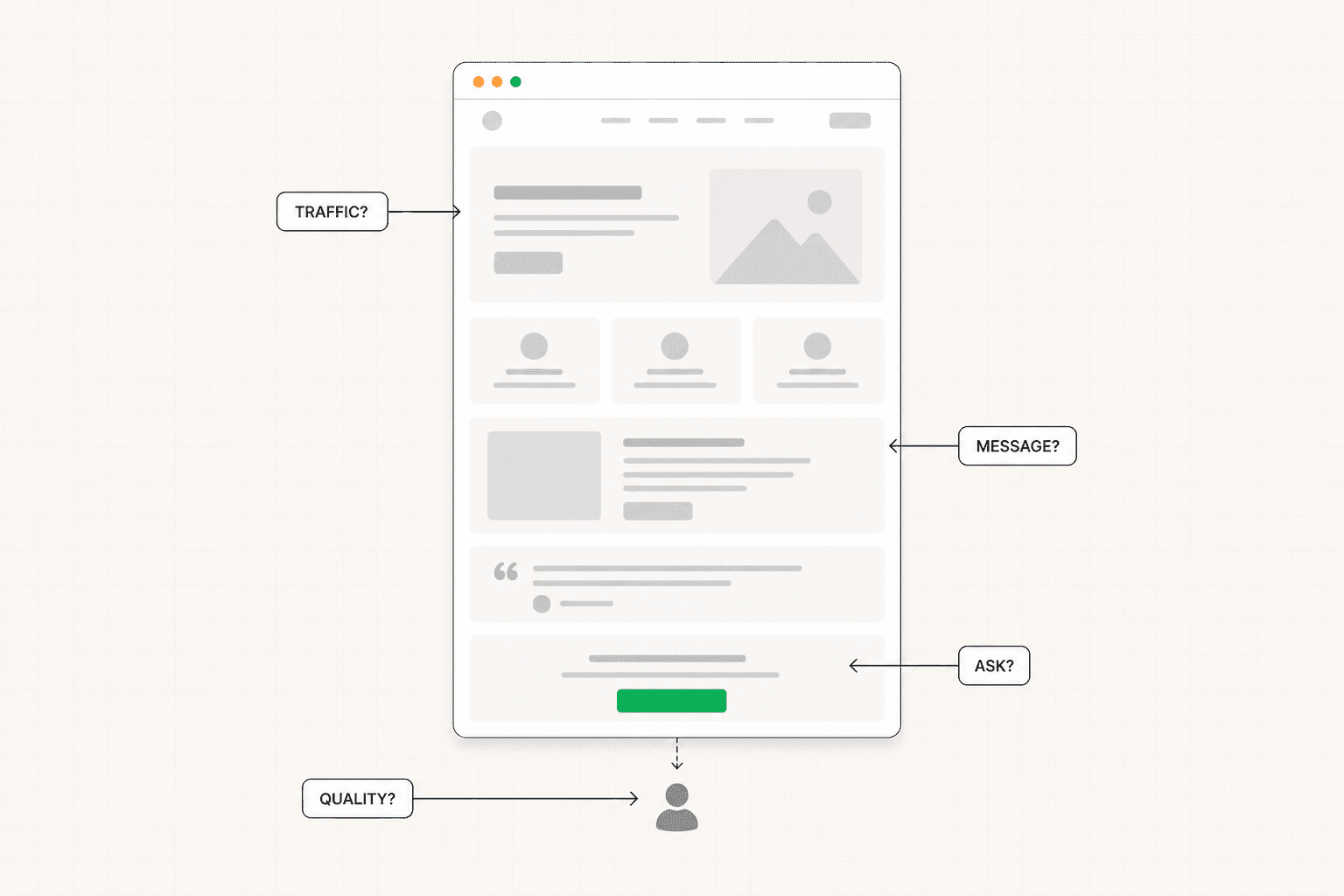
When someone says their website is not converting, they usually mean one of several different things, and each one has a different fix.
It could mean the conversion rate is below industry expectations. It could mean the conversion rate is fine but the leads coming through are not closing. It could mean the page is producing volume but the cost per acquisition makes the math unworkable. It could mean traffic dropped and the page no longer has enough visitors to draw any conclusions from. It could mean the business changed and the page no longer reflects what is actually being sold.
These problems all surface as "the website is not converting" in casual conversation. They are not the same problem and they cannot be solved by the same intervention. Treating them as one thing is the first reason most attempts to fix a website that is not converting fail. The team identifies a symptom and starts changing things before knowing what the underlying issue actually is.
The right starting point is diagnosis. Specifically, what is happening, where in the funnel it is happening, and why. Without those three answers, every change you make is a guess, and the results of those guesses are nearly impossible to interpret.
The First Question: What Does "Not Converting" Actually Mean Here?
Before looking at the page, get specific about what is failing.
Is the conversion rate too low? Compared to what benchmark, and is that benchmark realistic for your traffic source, offer type, and price point? A 2% conversion rate on cold paid traffic for a B2B service with a long sales cycle is normal. The same 2% on warm referral traffic for the same service is a problem. The number alone tells you nothing without the context.
Is the volume too low? You might have a page that converts at a perfectly reasonable rate but does not produce enough leads to support the business. That is a traffic problem, not a conversion problem, and it has a different fix entirely. Rebuilding the page will not solve a traffic shortage.
Is the lead quality the issue? Sometimes pages convert at high rates but produce leads that the sales team cannot close. This is qualification failure rather than conversion failure. The page is letting people through who were never realistic buyers, often because the messaging is too broad or the conversion friction is too low.
Is the cost per acquisition unworkable? On paid traffic, a reasonable conversion rate can still produce CAC that does not work for the business if the lead quality is mixed or the close rate downstream is weak. This problem might be diagnosed at the page level, the targeting level, or the offer level. Knowing which one matters before spending time optimizing.
Each of these requires a different response. Conflating them is why most "fix the website" efforts produce confusing results. The framework for thinking about this in context is here: What Is a Good Conversion Rate for a Landing Page?
The Second Question: Where in the Funnel Is the Breakdown?
Once you know what kind of problem you have, the next question is where it is happening.
Most websites that are not converting have a specific drop-off point that accounts for the majority of the lost conversions. Finding that point is significantly more useful than reviewing the whole site for general improvements, because it tells you where to focus and what kind of problem to look for.
The most common drop-off points fall into three rough buckets.
Visitors who leave almost immediately, before engaging with anything below the first screen. This is a relevance problem. The hero is failing to make the right person feel like they are in the right place, and they leave before the rest of the page gets a chance to do its job. The fix is in the messaging at the top of the page, not in the design lower down. The full breakdown of what the first screen needs to do is here: Above the Fold on a Landing Page: What It Is, Why It Matters, and How to Get It Right
Visitors who scroll through significant portions of the page but never reach the conversion action. This is usually an argument problem. The page is not building the case strongly enough, the proof is weak or misplaced, or the visitor has questions that the page is not answering. The fix is structural — looking at how the page is sequenced and where the trust is failing to build.
Visitors who reach the CTA but do not click. This is a friction or commitment problem. Either the ask is too big for where the visitor is in their decision, or the CTA copy is failing to reduce the small hesitation that builds at the point of action, or the surrounding copy is leaving objections unresolved at the exact moment they need to be addressed.
Each of these is diagnosable from analytics if you know what to look for. Scroll depth data, time on page, and exit points are usually enough to identify which of the three patterns you are seeing.
The Third Question: Why Is the Breakdown Happening?
Once you know where, the harder question is why. This is where most diagnostic work actually lives.
If the drop-off is at the first screen, the why is almost always one of three things. The hero is too generic and does not name a specific buyer or situation. The headline describes the product rather than the outcome the buyer cares about. Or the visual hierarchy is wrong and the visitor's eye is not landing on the headline at all. Each of these has a different fix.
If the drop-off is mid-page, the why usually traces to weak proof, missing objection handling, or a structural problem in how the argument is built. The features section might be leading with capabilities instead of outcomes. The testimonials might be generic and decoratively placed. The objections that come up most often in sales calls might never be addressed on the page. Each of these has a specific intervention.
If the drop-off is at the CTA, the why is often that the page has been doing its job up until that point but the final ask is mismatched. A demo request from a cold visitor is a heavy commitment. The visitor has been built to interest, not to readiness. Either the CTA needs to be lighter, or the page needs to do more work between the proof and the CTA to bridge interest to commitment.
The pattern across all of these is the same. The why is more specific than "the page needs improvement." It is a particular thing the page is doing or not doing that is costing conversions. Identifying that particular thing is what makes the next intervention targeted rather than speculative.
What to Check Before Concluding It Is the Page
Before assuming the page itself is the problem, there are a few alternative explanations worth ruling out.
Is the traffic match still right? If the page was built for a specific audience and the traffic sources have shifted, the page might be perfectly tuned for visitors who no longer represent the majority of arrivals. Paid campaign targeting can drift. Organic traffic mix can change as keyword rankings shift. A page that worked six months ago might be underperforming now because the traffic changed, not because the page did.
Is the offer still competitive? Pages do not exist in isolation. If competitors have repositioned, lowered prices, or improved their own pages, your page might be unchanged but suddenly looking weaker by comparison. The visitor is not evaluating your page against itself. They are comparing it to alternatives, often in real time across browser tabs.
Is the business itself still aligned with what the page promises? Sometimes the page is fine and the underlying offer has drifted. The product changed. The pricing changed. The ICP changed. The page still reflects an earlier version of the business, and visitors who follow through on the page's promise then meet a different reality somewhere downstream. This shows up as conversion failure on the page, but the actual fix is upstream.
Is there a technical problem? Pages that load slowly, render incorrectly on certain devices, or have broken forms can underperform for reasons that have nothing to do with messaging or conversion architecture. Run the page through actual usage on multiple devices before drawing conclusions. The most common version of this is a desktop page that breaks on mobile, where mobile traffic is a significant portion of the visitors.
Each of these is worth checking before treating the page as the root cause. Sometimes the page is the problem. Sometimes it is the messenger for a problem that lives elsewhere.
The Sequence That Actually Works
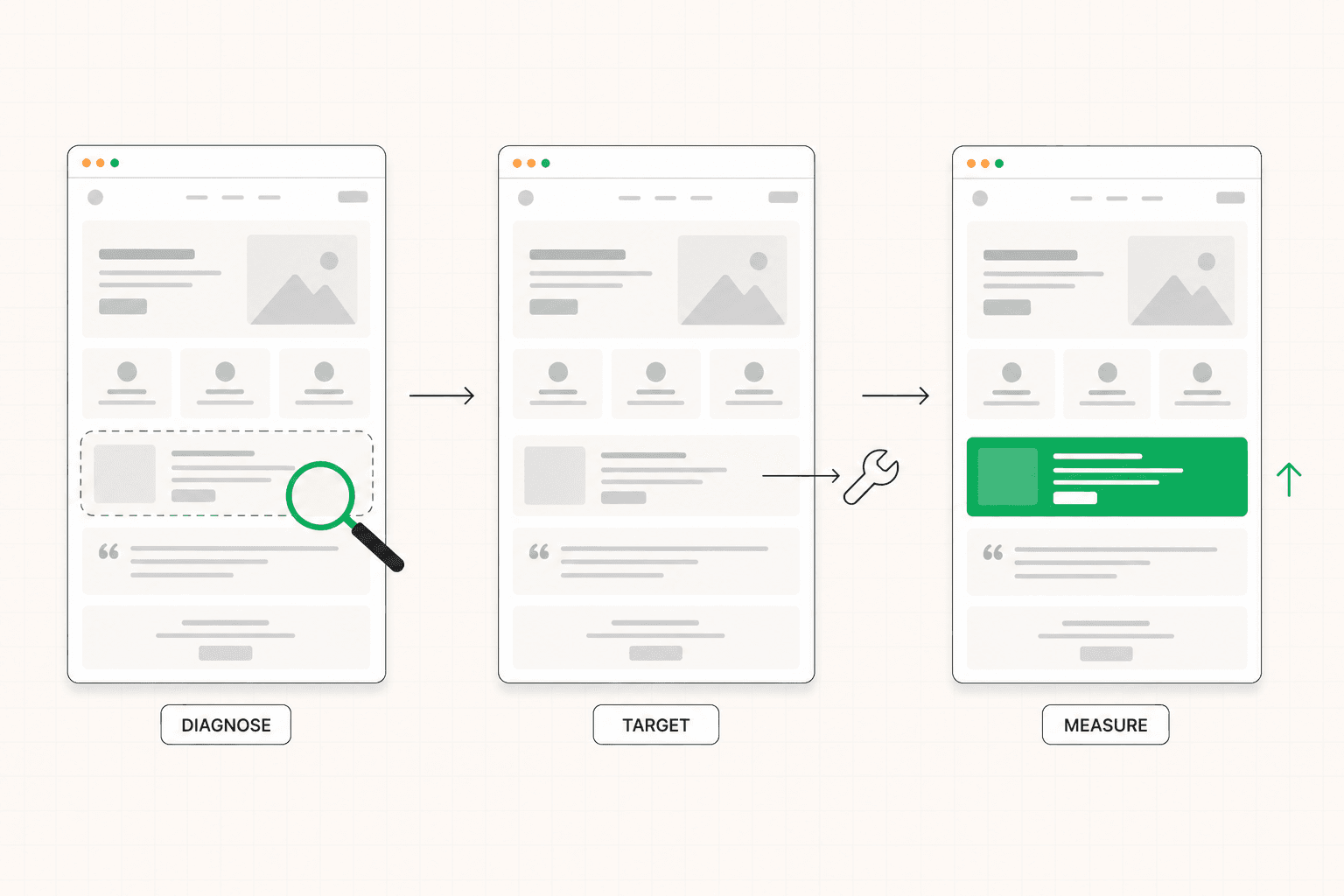
Given everything above, here is the sequence for diagnosing a website that is not converting.
Get specific about what kind of problem you have. Conversion rate, volume, lead quality, or unit economics. Naming it accurately is half the work.
Identify where in the funnel the breakdown is happening. First screen, mid-page, or CTA. Use the analytics you already have. The pattern is usually visible if you look for drop-off rather than for traffic.
Diagnose why the breakdown is happening at that specific point. Be specific. "The hero is not establishing relevance for the target buyer" is a diagnosis. "The page is underperforming" is not.
Rule out non-page causes. Traffic shifts, competitive changes, business drift, technical issues. If any of these are real, fix them before optimizing the page.
Then, and only then, intervene. Make one change at a time when possible. Measure the impact. Resist the urge to redesign everything at once because compound changes produce results you cannot interpret.
This sounds slower than just fixing things. In practice it is faster, because the alternative — a series of guesses that may or may not address the real problem — usually takes longer and costs more.
When You Cannot Diagnose It Yourself
Some situations make self-diagnosis genuinely difficult.
If the team is too close to the page to see it clearly, the diagnosis tends to confirm whatever the most senior person already believes about why it is not working. Internal politics around a specific section, attachment to a particular design choice, or pre-existing assumptions about the buyer can quietly distort the analysis.
If multiple things are broken simultaneously, isolating which one is doing the most damage requires the kind of pattern recognition that comes from having seen many different failing pages. One page might have three real problems at once, and a checklist-based review will surface all three without telling you which one to fix first.
If the team has been changing things repeatedly without seeing improvement, the optimization fatigue itself becomes a problem. The next change feels arbitrary because the previous five did not move the number, and it becomes harder to take any intervention seriously enough to commit to it.
In any of these situations, an external diagnosis is almost always faster than continued internal effort. The point of an audit is not to produce a long list of recommendations. It is to identify the one or two specific things that are costing the most conversions and tell you what to fix first. See how the 48h Audit works
The Short Version
A website that is not converting is not one problem. It is a category of problems that look similar from the outside and require different fixes once diagnosed.
The sequence that works is: name what kind of problem you have, identify where in the funnel the breakdown is happening, diagnose why it is happening at that specific point, rule out non-page causes, and then intervene with targeted changes you can measure.
Skipping the diagnosis is the most common reason fix-the-website efforts produce confusing results and wasted budget. Spending the time to diagnose first is almost always the faster path, even when it feels slower in the moment.
The page is not the problem. The unidentified problem the page is expressing is the problem. Find it before you change anything.
Keep reading