Shopify Conversion Rate Optimization: What Actually Moves the Number

@nadolconverts
Kacper Nadol

Shopify gives you a working store out of the box, which is exactly why so many Shopify stores convert below what they should. The defaults are built for launching, not for converting. This article covers where Shopify stores lose sales and what to fix, in order of leverage.
Why Shopify Stores Underconvert
Shopify is very good at getting a store live. Pick a theme, add products, connect a payment provider, and you have a functioning ecommerce business in an afternoon. That accessibility is the platform's greatest strength and the reason so many stores on it convert below their potential.
The defaults are optimized for launch, not for conversion. A stock theme gives you a homepage banner, a product grid, a product page template, and a checkout, all of which work. None of which were designed around your specific buyer, your specific product, or the specific doubts standing between a visitor and a purchase. They are neutral containers, and neutral containers convert like neutral containers.
The result is a large population of Shopify stores that look competent, function properly, and convert at rates well below what the same traffic and the same products could produce. The store is not broken. It is just generic, and generic is expensive.
The good news is that Shopify stores tend to underperform in a predictable set of ways, most of which are fixable without a rebuild. Knowing where to look is most of the work.
Start With Where You Are Losing People
Before changing anything, find out where in the funnel your store is actually losing sales, because the fix depends entirely on the answer.
Shopify's own analytics will show you the basic shape: sessions, sessions that reached a product page, sessions that added to cart, sessions that reached checkout, and sessions that converted. That sequence is enough to locate the biggest leak, which is the single most useful piece of information you can have before starting any optimization work.
Visitors landing and leaving without viewing a product point to a problem at the entry point. Either the store is not communicating what it sells quickly enough, the traffic is poorly matched to what you offer, or the site is slow enough that people leave before it loads.
Visitors viewing products but not adding to cart point to a product page problem. The page is failing to resolve their uncertainty, and the buyer's unanswered questions become a reason not to commit.
Visitors adding to cart but not checking out point to a cart or checkout problem. These are the most recoverable losses in the whole funnel, because the buyer already decided.
Each of these has a different fix, and applying product page changes to a checkout problem produces nothing while everyone wonders why the numbers did not move. The funnel-wide framework is here: Ecommerce Conversion Rate Optimization: What Actually Moves Revenue
The Theme Is Not the Problem, But the Defaults Might Be
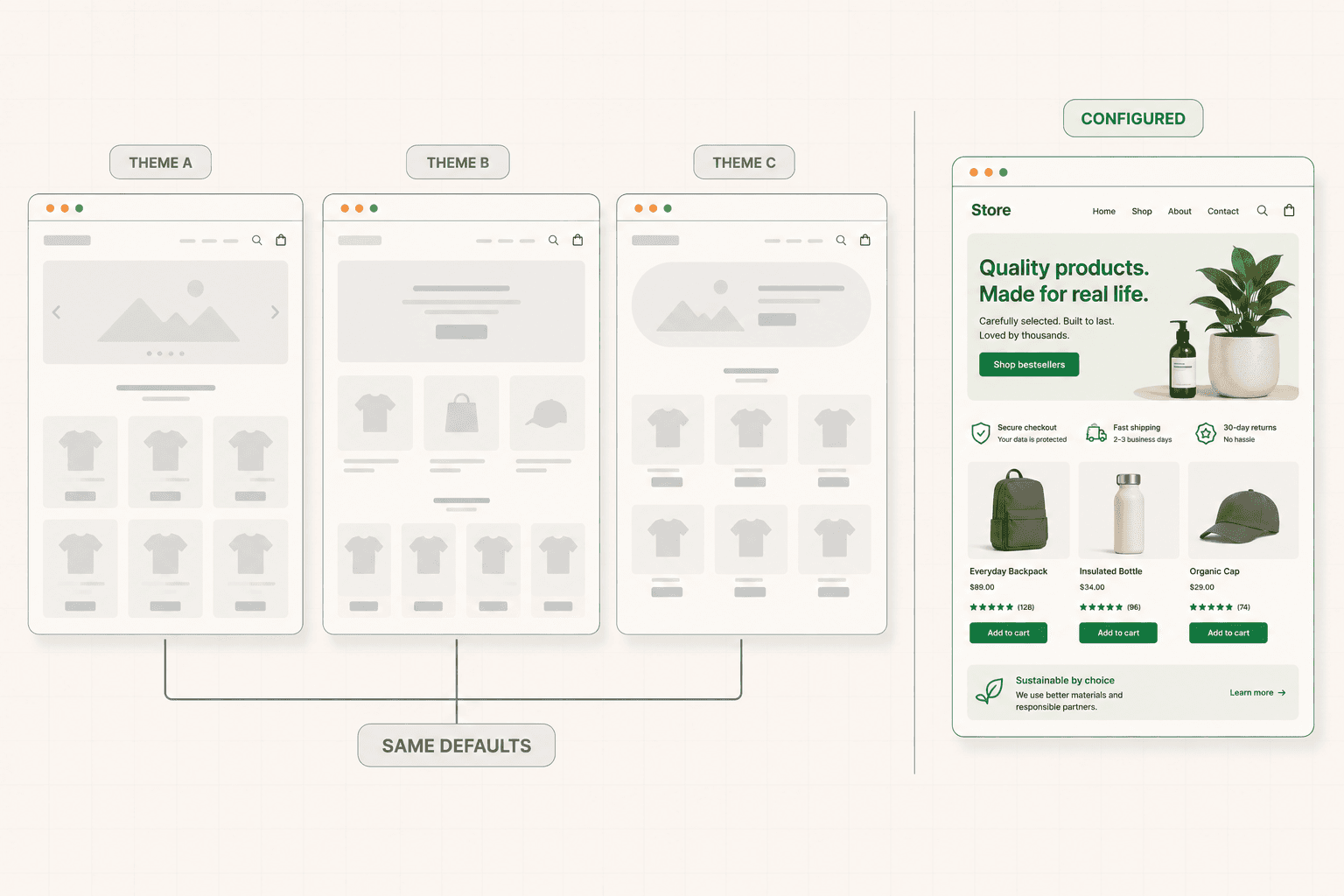
Shopify store owners often assume that switching themes will fix conversion. It rarely does, because the theme is not usually what is broken. What is broken is that the theme's default configuration was never adapted to the specific store.
Most themes ship with a homepage structure that assumes a generic store: a hero banner, a featured collection, some blocks for text and images, a newsletter signup. Store owners fill these in with whatever they have and move on. The result is a homepage that tells the visitor almost nothing specific about why this store is worth buying from, because the structure was never designed to communicate that.
The fix is not a new theme. It is deciding what your store actually needs to communicate in the first screen and configuring the theme to do that. What do you sell, who is it for, and why should someone buy it here rather than somewhere else? A homepage banner that answers those questions converts differently to one that shows a lifestyle photo and the word "New Season."
The same applies to the product page template. The default layout puts the image, title, price, and add-to-cart button in a standard arrangement, with the description below. That arrangement is fine as a starting point and rarely optimal as a finished product. Whether reviews appear high or low, whether shipping information is visible near the button, whether the description leads with outcomes, are all configuration decisions that matter more than which theme you picked. The full framework for the product page is here: Product Page Optimization: What Actually Turns Browsers Into Buyers
Speed Is a Conversion Problem on Shopify Specifically
Shopify stores accumulate speed problems in a way that is specific to the platform, and slow stores lose sales before the buyer sees anything.
The mechanism is apps. Shopify's app ecosystem is genuinely useful, and it is also the most common cause of slow stores. Each app adds scripts to the page. Most store owners install apps over time, try things, and never remove the ones they stopped using. The scripts remain, loading on every page view, slowing everything down for every visitor.
Themes contribute too. Feature-heavy themes with sliders, animations, and large uncompressed images can add seconds to load time, and every additional second costs conversions, particularly on mobile connections.
The fix is unglamorous maintenance. Audit the installed apps and remove the ones no longer in use, checking that their scripts are actually gone rather than just deactivated. Compress images, which are usually the largest single contributor to page weight on ecommerce stores. Be selective about theme features that add weight without adding conversion.
This matters more on mobile, where connections are slower and patience is shorter, and where most Shopify traffic now arrives. A store that loads acceptably on desktop broadband and painfully on a phone on mobile data is losing a large share of its traffic before anyone sees a product.
The Checkout You Can and Cannot Change
Shopify's checkout is largely standardized, which is both a limitation and a benefit. The benefit is that it is well built and familiar to buyers, which reduces friction and increases trust. The limitation is that you have less control over it than you do over the rest of the store.
Within those constraints, several things are worth getting right.
Guest checkout should be available. Forcing account creation before purchase costs first-time buyers, and Shopify makes guest checkout straightforward to enable. There is rarely a good reason not to.
Shipping costs should not surprise anyone at the final step. Unexpected costs at checkout are the single most cited cause of cart abandonment across ecommerce, and Shopify stores are not exempt. Surface shipping costs, or at least clear estimates and free shipping thresholds, earlier in the journey so the total at checkout matches what the buyer expected.
Payment options should match what your audience uses. Shopify supports a wide range, including the accelerated checkout options that let buyers complete a purchase in a couple of taps. Enabling the ones your buyers actually prefer removes friction that is entirely avoidable.
And the pre-checkout stages, the cart and the transition into checkout, are within your control and worth attention. The cart is where second thoughts surface, and a cart that offers reassurance about returns, shipping, and security holds more buyers than one that just lists items and a total. The full framework is here: Checkout Optimization: How to Build a Flow That Doesn't Lose Buyers
The App Trap
Shopify's app store makes it very easy to add functionality, and this creates a specific failure pattern worth naming.
A store underperforms. The owner looks for a solution and finds an app. Install an upsell app, a urgency app, a popup app, a reviews app, a bundling app. Each one promises a conversion lift. Each one adds scripts, visual clutter, and often a popup or banner competing for the visitor's attention.
The cumulative effect is frequently negative. The store gets slower. The pages get busier. The visitor faces multiple interruptions between arriving and purchasing. And the underlying problem, usually a product page that does not resolve doubt or a homepage that says nothing specific, remains untouched because nobody diagnosed it.
Apps are useful when they solve a problem you have identified. They are expensive when they substitute for diagnosis. A store with a clear leak at the product page will not fix it by installing an urgency timer, and the timer will slow the store down while adding a note of desperation that erodes trust.
The discipline is to diagnose first, then ask whether an app is the right solution to the specific problem you found, then check what it costs in speed and clutter. Most stores would convert better with half the apps they have installed.
The pattern of reaching for a tool instead of a diagnosis shows up constantly, and not just on Shopify. It is one of the things I end up writing about most in the newsletter.
Trust Signals Matter More for Smaller Stores
A buyer arriving at a Shopify store they have never heard of is carrying a specific anxiety that buyers on large marketplaces do not have. Is this a real business? Will the product arrive? What happens if something goes wrong? Can I trust them with my card details?
Larger brands do not have to answer these questions because their name does it for them. Smaller and newer stores do, and failing to answer them costs sales from buyers who were otherwise ready.
The elements that address this are not complicated. Clear, easy-to-find contact information that signals a real business behind the store. A returns and shipping policy stated plainly rather than buried in a footer link. Genuine reviews, ideally with detail rather than just star ratings. A professional, consistent store design, since visual polish reads as legitimacy whether or not that is fair. And clarity about who you are, which an about page done properly can provide.
None of this is conversion trickery. It is answering the reasonable questions a cautious buyer has about an unfamiliar store, and answering them where the buyer is likely to be wondering rather than requiring them to go looking. The framework for using proof effectively is here: Social Proof: How to Use It So It Actually Converts (Not Just Decorates)
The Order of Operations
If you want to improve conversion on a Shopify store, sequence matters as much as the individual changes.
Find the biggest leak first, using the funnel data Shopify already gives you. Everything else depends on knowing whether the problem is entry, consideration, or checkout.
Fix the store speed if it is bad, because it affects everything downstream and is usually caused by removable app scripts and uncompressed images.
Fix the product page if the loss is at consideration, since that is where the buying decision actually happens and where most stores underinvest.
Fix the pre-checkout experience if the loss is at cart, particularly around cost transparency and reassurance.
Check mobile specifically at every stage, because that is where most of the traffic is and where the friction is worst.
And resist installing an app until you know what problem you are solving.
If you are not sure where your store is leaking, a structured diagnosis maps the specific breakdown points before any changes are made. See how the 48h Audit works
The Short Version
Shopify gets you a working store quickly, and the defaults are built for launching rather than converting. Most underperforming Shopify stores are not broken, just generic, and generic is expensive.
Find the biggest leak before changing anything. Configure the theme to communicate something specific rather than accepting the default arrangement. Fix speed, which on Shopify usually means removing unused app scripts and compressing images. Get the product page resolving buyer doubt rather than just displaying products. Surface shipping costs before checkout so the total is never a surprise. Give unfamiliar buyers the trust signals they need. And stop installing apps in place of diagnosis.
The traffic you already have is worth more than the traffic you have not bought yet. Most Shopify stores are leaving a significant share of it on the table.
Keep reading