Lead Capture Form: How to Build One That Converts (And Qualifies)

@nadolconverts
Kacper Nadol

The lead capture form is the exact point where interest becomes a lead or disappears. Most forms ask for too much, too soon, in a way that kills conversion, or too little, in a way that floods the sales team with unqualified contacts. This article covers how to build a form that converts well and produces leads worth following up.
The Form Is Where Interest Becomes a Lead or Vanishes
Every lead capture form sits at a precise and fragile moment in the funnel. The visitor has been interested enough to reach the form. They are considering taking the step from anonymous visitor to identified lead. And the form itself, in that exact moment, either makes that step feel easy and worthwhile or makes it feel like more friction than it is worth.
This makes the form one of the highest-leverage and most underexamined elements in lead generation. A small change to a form can move conversion significantly, in either direction, because the form is the literal conversion point. Everything before it was building toward this moment. Everything after it depends on getting through it.
Most forms underperform for one of two opposite reasons. Either they ask for too much, creating friction that causes interested people to abandon before completing. Or they ask for too little, capturing anyone with no qualification, which floods the sales team with contacts that mostly go nowhere. Getting the balance right is the core of form optimization, and the right balance depends entirely on what the business actually needs from the lead.
The Length Problem Cuts Both Ways
The single most consequential decision about a lead capture form is how much to ask for. And the right answer is genuinely a tradeoff, not a universal rule.
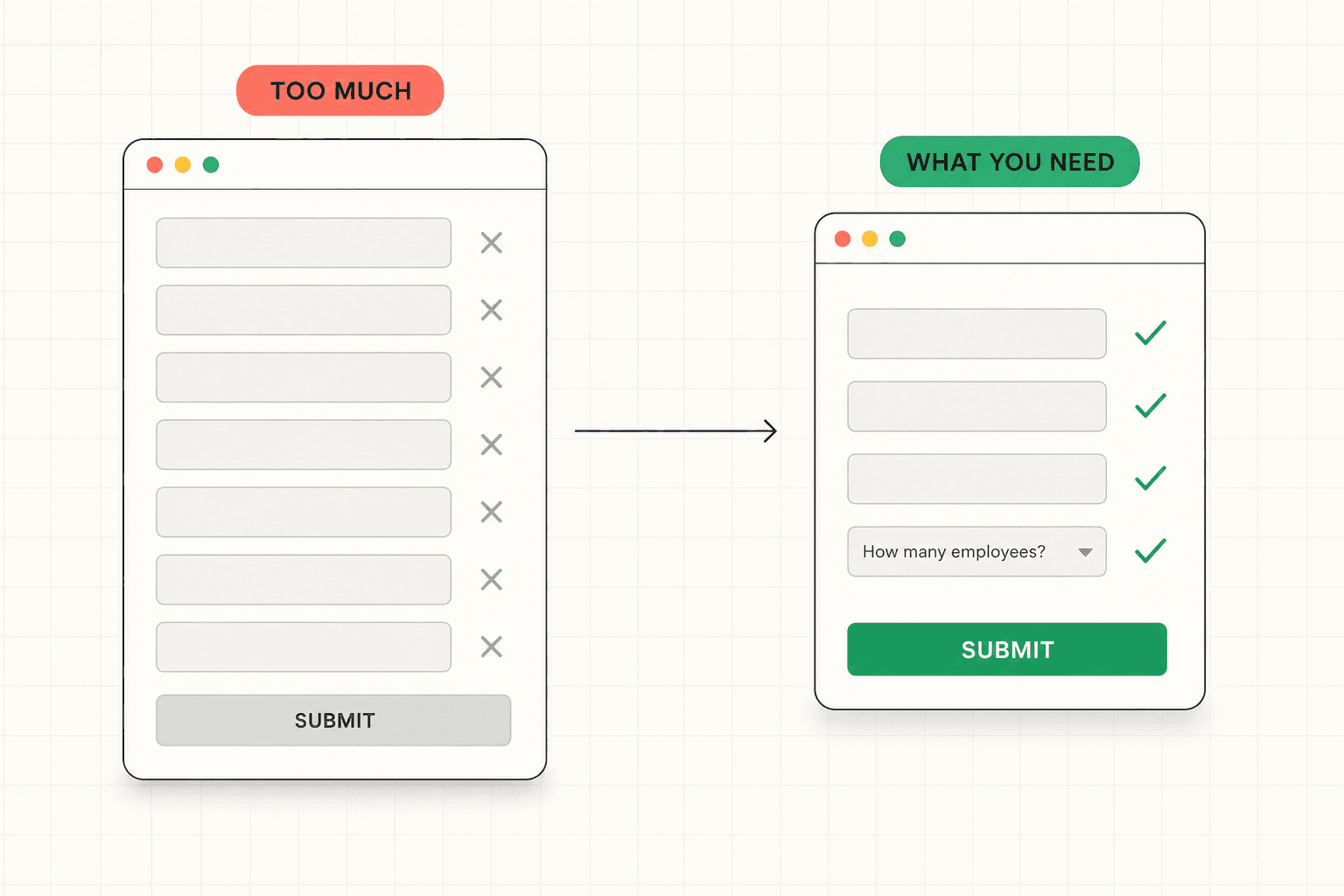
Every field you add reduces the percentage of visitors who complete the form. This is well established. A form asking for name and email converts at a higher rate than one asking for name, email, company, role, company size, and phone number. Each additional field is a small additional reason to abandon, and the abandonment compounds across fields.
But fewer fields is not automatically better, because the fields are doing two jobs. They capture contact information, and they qualify the lead. A form that asks only for an email address converts at a high rate and produces leads about whom you know almost nothing. For a low-ticket offer or a top-of-funnel content download, that is fine. For a B2B business where a qualified lead is worth real money and the sales team's time is limited, a flood of unqualified email addresses is not a win. It is a different problem wearing the disguise of a high conversion rate.
The right form length is determined by what the business actually needs to qualify and follow up effectively, balanced against the conversion cost of each additional field. The goal is not the shortest possible form or the most informative possible form. It is the form that captures exactly what is needed and nothing more. The full framework for balancing conversion against qualification is here: How to Qualify Leads on Your Website Without Killing Conversions
What to Actually Ask For
The fields on a lead capture form should each earn their place by serving a genuine need, either for follow-up or for qualification. Fields that serve neither should be cut.
For most B2B lead generation, the core fields that earn their place are a name, a work email, and a company name. These cover the basics of who the person is and where they work. Beyond that, every additional field should be justified by a specific operational need.
A phone number field reduces conversion meaningfully and should only be included if the sales process genuinely depends on calling, and if the business is willing to trade conversion volume for the ability to reach leads by phone. Many businesses include it out of habit and pay the conversion cost for data they rarely use.
A qualification field, framed naturally, can do significant work. A single well-chosen question that reveals whether the lead is a realistic fit, like budget range, team size, timeline, or use case, can filter out poor-fit leads without adding much friction. The key is framing it as a natural part of understanding the lead's needs rather than as an obvious screening gate, and limiting it to the one or two questions that actually matter for qualification.
The fields to be most skeptical of are the ones that serve internal convenience rather than genuine need. Job title when it does not affect how the lead is handled. Company size when it does not change the follow-up. How did you hear about us, which most people answer inaccurately anyway. Each of these costs conversion and often delivers data that never gets used. The discipline is to question every field and keep only the ones that genuinely earn their place.
The Copy Around the Form Does Real Work
The form fields get most of the attention, but the copy surrounding the form has a significant impact on conversion that teams often overlook.
The form needs a heading that reinforces the value of completing it. Not "Contact us" or "Sign up," but something that restates what the visitor gets by filling it out. "Get your free audit" or "See your custom report" or "Book your strategy call" reminds the visitor, at the moment of commitment, why this is worth their information.
The copy near the submit button can reduce the last hesitation. A line addressing what happens next, how quickly they will hear back, or what they are committing to removes the uncertainty that builds at the point of action. "We will get back to you within one business day" or "No spam, just the report" or "A 20-minute call, no pressure" each resolves a small concern that might otherwise cause abandonment.
The submit button copy itself should describe the action and the outcome rather than using generic labels. "Get my audit" outperforms "Submit." "Send me the guide" outperforms "Download." The same specificity that improves any CTA improves the form's submit button, because it is a CTA. The full breakdown of what makes CTA copy work is here: Call to Action Examples: What Actually Makes a CTA Convert (Beyond Button Color)
Privacy reassurance also matters, especially as buyers become more protective of their contact information. A brief, genuine statement about how the information will be used, placed near the submit button, reduces the hesitation that comes from worrying about what happens to the data after submission.
Form Design and Friction
Beyond the fields and the copy, the design and behavior of the form affect conversion in ways that are easy to overlook and easy to fix.
A form that is visually clear and obviously simple to complete converts better than one that looks complicated, even if they ask for the same information. Clean spacing, clear labels, and a layout that makes the form feel quick to fill out all reduce the perceived effort, which affects whether people start filling it out at all.
The behavior of the form matters too. Fields that validate helpfully rather than punitively, error messages that explain clearly what went wrong, and a form that does not lose the user's input when something fails all reduce the friction that causes abandonment mid-completion. A buyer who fills out five fields, makes one error, and loses everything is a buyer who often does not start again.
Mobile is where most form friction concentrates. A form that is manageable on desktop can be genuinely painful on a phone, where every field requires tapping, the keyboard covers half the screen, and small touch targets create errors. Designing the form for mobile completion, with appropriately sized fields, the right keyboard types for each field, and a layout that works at narrow widths, recovers conversion that desktop-first forms quietly lose.
The number of steps also matters. A multi-step form that breaks a longer set of questions into smaller, less intimidating chunks sometimes converts better than the same questions presented all at once, because each step feels manageable. This is not universal, but for forms that genuinely need more information, breaking the form into steps with a visible progress indicator can reduce the abandonment that a long single-page form produces.
Where the Form Sits in the Page Matters
A lead capture form does not exist in isolation. Its conversion rate depends heavily on what came before it on the page.
A form placed before the visitor has been given a reason to fill it out will convert poorly no matter how well designed it is. A form placed after the page has built a clear case for why the visitor should take the next step will convert better, because the visitor reaches it already convinced. The form is the conversion point, but the page is what produces the readiness to convert.
This means form optimization is not only about the form. It is also about whether the page has done its job of building enough value and trust by the time the visitor reaches the form. A form converting poorly is sometimes a form problem and sometimes a page problem, where the form is fine but the visitor was never given enough reason to complete it. Distinguishing between these matters, because the fix is different. The full framework for what the page needs to do before the conversion point is here: Lead Generation Landing Page: What Makes It Actually Produce Leads
For forms that serve high-intent visitors, like a contact or demo request form, placement and accessibility matter most. The form should be easy to find and easy to reach. For forms that serve lower-intent visitors, like a content download, the value of the offer and the surrounding copy do more of the work, because the visitor needs more convincing that the exchange is worth it.
How to Optimize Your Own Form
If you want to improve a lead capture form, start by being honest about what each field is actually for.
Go through every field and ask whether it serves follow-up, qualification, or neither. Cut the ones that serve neither. For the ones that serve qualification, ask whether they are worth the conversion cost, or whether the qualification could happen later in the process without losing the lead. This single exercise often reveals two or three fields that are costing conversion without delivering value.
Then look at the copy. Does the form heading reinforce the value of completing it? Does the copy near the submit button reduce the last hesitation? Does the submit button describe the action and outcome, or does it just say "submit"? Each of these is a quick fix with a measurable impact.
Then check the experience, especially on mobile. Fill out your own form on a phone. Note every moment of friction. Each one is conversion you are losing from mobile visitors, who are often a large share of the traffic.
If the form is converting poorly and you are not sure whether the problem is the form itself or the page leading up to it, a structured diagnosis identifies where the breakdown is actually happening before you start changing things. See how the 48h Audit works
The Short Version
The lead capture form is the precise point where interest becomes a lead or disappears, which makes it one of the highest-leverage elements in lead generation.
Most forms fail by asking for too much, which kills conversion, or too little, which floods the sales team with unqualified contacts. The right form captures exactly what the business needs to follow up and qualify, and nothing more. Every field should earn its place.
The copy around the form does real work: a heading that reinforces the value, reassurance near the submit button, and a submit button that describes the action and outcome. The design should minimize friction, especially on mobile. And the form's conversion depends on whether the page built enough readiness before the visitor reached it.
Question every field. Keep only the ones that earn their place. The form is the conversion point, so getting it right pays off directly.
Keep reading